Twitter, also known as X, has become one of the most influential social media platforms, connecting millions of users worldwide. Your username on Twitter is your digital identity, which makes it easier for followers and potential clients to find and remember you.

For the best results, you need a unique and memorable Twitter username, whether it’s for personal or business branding. By making your Twitter username stand out, you can build a strong online presence, significantly improving user’s perception you or your business in the digital world.
However, there are instances where you may need to recover your Twitter username, whether you forgot it, are facing account suspension, or are experiencing account inactivity. In such scenarios, knowing how to recover your Twitter username is important. This guide provides some proven tips to help you regain your Twitter identity.
How to Recover Your Twitter Username
Losing access to your Twitter account can be frustrating, especially when your username represents your personal or brand identity online. Fortunately, there are several ways to regain access, some of which include:
1. Recover Through Email and Phone Number
If you’ve forgotten your Twitter username but still have access to the email or phone number associated with your account, follow these steps:
Step 1: Go to Twitter’s login page.
Step 2: Click on the “Forgot password?” link.
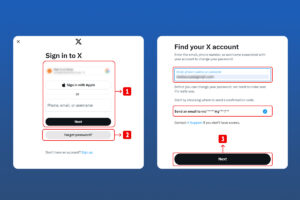
Step 3: Enter your registered email address or phone number and click “Next.”
Step 4: Twitter will send a password reset link to your email or a code to your phone.
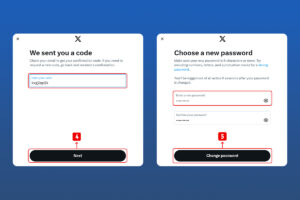
Step 5: Follow the instructions in the email or enter the code received to reset your password and recover your username.
2. Recover Through Different Account
If you have another Twitter account or can access a friend’s account, use Twitter’s search function to find your original account. Here are the steps:
Step 1: Log in to your alternative Twitter account.
Step 2: Use the search bar to look for your original account by entering your real name or any related information.
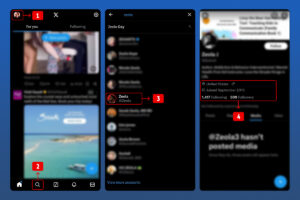
Step 3: Once you find your account, check for any email or phone information in your bio or previous tweets that might help you recover your account.
3. Recover Deactivated Twitter Account
If your account was deactivated, you have 30 days to reactivate it and recover your username:
Step 1: Go to the Twitter login page.
Step 2: Enter your username and password for the deactivated account.
Step 3: You will get a notification to confirm the actions required to reactivate your account.
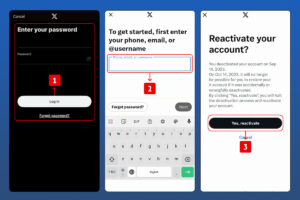
Step 4: Follow the prompts “reactivate” that show in your account.
If your account has passed the 30-day deactivation period, the system will delete your account, and you won’t be able to recover it. However, you might still be able to use the previous username for a new account, provided it hasn’t been taken yet.
4. Recover Username without Email and Username
It can be challenging to recover a Twitter username without an email or phone number. However, if you’re faced with this issue, you can follow these steps:
Step 1: On the Twitter Login page, enter your phone number and click on “Next.”
Step 2: You will then have to enter your password. If you remember your password, type it into the text box.
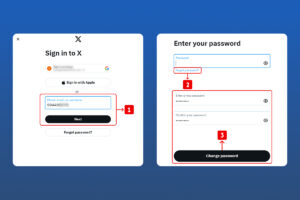
Step 3: If you have forgotten your password, click on “Forgot Password” and follow the prompts to reset your password.
5. Recover Username by Contacting Support
If the above methods don’t work, your next option will be to contact Twitter support directly for assistance. Recovering your username through support can be a bit more complex, but it’s worth a try if you’ve exhausted all other options. Here’s how to go about it:
Step 1: Visit the Twitter Help Center and navigate to the “Contact Us” section.
Step 2: Choose the issue that best fits your situation, such as “I need login and account support.”
Step 3: Fill out the form with as much detail as possible about your account and the issue you’re facing. Be sure to mention that you’re looking to recover your Twitter username.
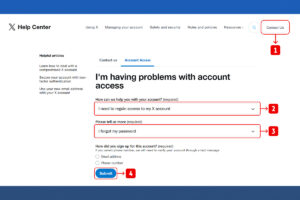
Step 4: Submit your request and wait for a response from Twitter’s support team.
Twitter’s support team will review your request and assist you in recovering your username. This process may require you to provide additional information to verify your identity and ownership of the account. While it might take some time, contacting support can help you regain access to your account and recover your username when other methods aren’t successful.
6. Recover from Inactive Accounts

Your Twitter account can get deleted if you leave it deactivated for more than 30 days, in which case your username might become unavailable. Twitter can also deactivate accounts due to prolonged inactivity or if they violate Twitter’s policies.
To retrieve your Twitter username that has been taken or get a different username that belongs to an inactive account, you need to start monitoring it to claim it. For the best results, use our Handle Monitor tool to track the availability of specific Twitter usernames.
Once the desired username becomes available, you can quickly claim it by creating a new account with that username. Our tool will monitor the inactive username 24/7 and notify you when the username becomes available, allowing you to claim at the right time before anyone else claims it.
Conclusion
Recovering your Twitter username doesn’t have to be a daunting task. By following these steps, you can regain access to your X profile or claim a new username that better represents your online identity. It’s always necessary to take proactive measures, such as updating contact details and enabling two-factor authentication, to safeguard your account.
This will help you avoid the hassle of recovery and maintain control over your digital identity. Protecting your Twitter account now can save you from future recovery challenges, ensuring your online presence remains secure.

Leave a Reply